Tasks Reference
Please make sure you also read the section on Task Namespaces.
Fundamental Tasks
Getting Help
help is the default task in the root namespace, so that just calling inv
gives a reasonable response. It combines the global help (inv -h) and the
task listing (inv -l).
Project Cleanup
The clean task gets rid of various groups of generated files,
selectable by options. These options are:
-a, --all        The same as --backups --bytecode --dist --docs
-b, --backups    Also clean '*~' files etc.
-d, --docs       Also clean the documentation build area
-e, --extra      Any extra patterns, space-separated and possibly quoted
-i, --dist       Also clean the 'dist' dir
-t, --tox        Include '.tox' directory
-v, --venv       Include an existing virtualenv (in '.' or in '.venv')
-y, --bytecode   Also clean '.pyc', '.pyo', and package metadata
Note that --all is selective and only cleans out ‘cheap’ files;
it especially excludes a local virtualenv that carries state (installed packages)
you might not have recorded safely in requirements files yet, and the
tree generated by tox that can take a while to reproduce.
The --extra options allows you to add any custom glob patterns to clean out.
Building the Project
Invoking build just delegates to setup.py right now.
In the future, automatic detection of other project components
like a Maven POM or Javascript build files might trigger additional build tools.
You can also include the docs task by adding the --docs option.
Freezing Requirements
Calling freeze writes the frozen requirements as found in the current environment
into the file frozen-requirements.txt, by calling pip freeze.
Executing Tests
The test.pytest and test.tox tasks call the related testing tools with
appropriate parameters. Coverage configuration is added to the py.test call,
and if you pass the --coverage option, the generated report is loaded into
your web browser. In case the py.test command isn’t available, calling the
test runner is delegated to setup.py.
For test.tox, PATH is extended according to the directories in the
rituals.snakepits configuration value, which defaults to
/opt/pyenv/bin:/opt/pyrun/bin. That way, you can provide the Python
interpreter versions to run multi-environment tests locally.
Documentation Tasks
Building Sphinx Documentation
Rituals provides automatic process management of a sphinx-autobuild
daemon, which means you easily get a live-reload preview in your browser.
To start the build watchdog, use inv docs -w -b.
The -b means to open a new browser tab,
after the server process is ready.
To kill the server, call the inv docs -k command.
You can check on the status of a running daemon with inv docs -s.
Note that sometimes you have to manually trigger a full rebuild via
inv docs --clean, especially when you make structural changes
(e.g. adding new chapters to the main toc-tree).
Your browser will change the view to an empty canvas, just
initiate a reload (Ctrl-R) when the build is done.
Typically this is needed when the sidebar TOC is out of sync, which happens
due to the optimizations in sphinx-autobuild that make it so responsive.
Publishing Documentation
To upload documentation to either PyPI or a WebDAV server (like Artifactory),
you can use the docs.upload tasks after using docs.sphinx. By default,
the documentation hosting of PyPI is used.
To enable a local documentation server, set the following environment variables (e.g. in your ~/.bashrc):
export INVOKE_RITUALS_DOCS_UPLOAD_METHOD=webdav
export INVOKE_RITUALS_DOCS_UPLOAD_TARGETS_WEBDAV_URL='http://repo.example.com/artifactory/wwwdata-local/python/{name}/{version}/{name}-{version}.zip;kind=docs'
This example shows a configuration for an Artifactory server, and as you can see
the name and version of the project can be used to generate appropriate URLs.
The version defaults to latest, unless you provide a specific version number via the --release option.
To use the upload in a browser, add !/index.html to the URL of the ZIP file,
and make sure the configuration of your Artifactory installation correctly handles
image and other relevant MIME types.
Note that you can override the default upload method using the target option,
i.e. adding --target pypi to your task invocation will upload the docs to PyPI no matter what.
Note
The WebDAV upload is tested with Artifactory 4.x, if you encounter problems with other repository servers, open a ticket so support for them can be added.
Release Workflow
Managing Development Versions
For intermediate test releases, you can automatically generate a dev version
compliant to PEP-440.
The release.bump task generates this version, and rewrites the tag_build
value in setup_cfg.
For this to work, the config file must already exists, and contain a line with
an existing tag_build setting, like this:
[egg_info]
tag_build = .dev
tag_date = false
The created version strives to uniquely describe the code being packaged,
so it can get quite lengthy.
The “worst case scenario” when it comes to length looks like this:
1.2.2.dev4+1.2.1.g07c5047.20170309t1247.ci.42.
Let’s dissect this:
1.2.2is the next-release version as reported bysetup.py..dev4means we are 4 commits beyond the last release version.1.2.1is that last release version, found via checking the annotatedgittags.g07c5047is thegitcommit hash of theHEADref.- Having the
20170309t1247timestamp means the working directory at the time of the task execution was dirty (had uncommitted changes). ci.42is appended when the environment contains aBUILD_IDvariable (in this case, set to42).
Use the --pypi option to prevent creation of the local part of the version info
(anything after the +). This allows you to push development versions to PyPI
for open beta release testing. In those cases, you should commit setup.cfg
with the specific tag_build setting, and then git tag that commit.
Adding -v for verbosity shows a few more details of assembling the version
information. Right now, only git is really supported regarding SCM metadata.
Anything else will give you Unsupported SCM warnings when using this and some
other tasks.
Building a PEX Distribution
TODO
Continuous Integration
Jenkins
Note that tasks related to Jenkins are only available by default when the
environment variable JENKINS_URL is defined.
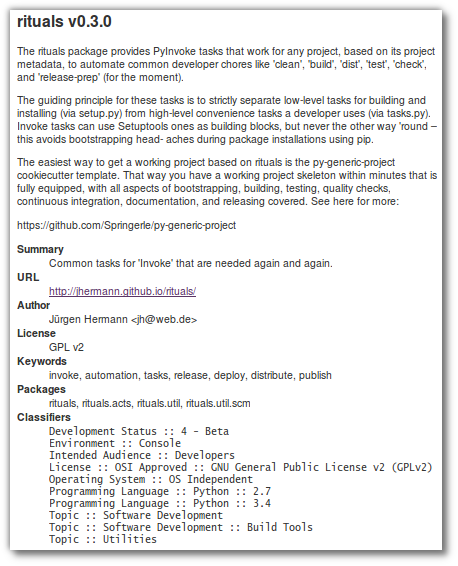
The jenkins.description task creates a text file (by default build/project.html) that can be used via the
Jenkins Description Setter plugin to dynamically fill the Jenkins job description from already available metadata.
The resulting description looks like the example on the right.